Webflow Migration

Your website. Your rules.

Frustrated by Webflow's limitations? We'll move your site to Astro, preserving its design, content and SEO — and give you new ways to build on it with AI.

Webflow to Astro migration
  • Develop your site with AI.In CMS packages, edit content with AI through MCP and Bee CMS, and work directly with the code in your repository.
  • Choose how you edit.Use an AI assistant or the traditional CMS panel. The static package gives you the code without a CMS.
  • Gain speed and more independence.Modern architecture, fewer platform limits and a fixed migration price.

Let's see whether migration makes sense for your site.

Pricing

Choose how you want to grow your website.

Every package gives you a better way to work with your website. Choose a fast, AI-ready static site or the flexibility of editing through AI and a CMS. You'll know the price before work begins.

SMALL

Static Export

Keep your existing website as it is. We'll move it to fast static files and run it without a Webflow CMS dependency. You get repository access, so you can develop the code yourself, with a developer or with an AI assistant.

€ 490

Get started
  • Full site export

    All pages, styles and scripts moved to static HTML, CSS and JS.

  • Fast deployment

    Hosting configured and ready for your domain.

  • Working forms

    Contact and lead forms rebuilt and tested.

  • SEO preserved

    Metadata carried over and old URLs mapped to redirects.

Best for business websites and landing pages without CMS Collections or frequent content updates.

MEDIUM

Astro + CMS – Basic

Move your site to Astro and get Bee CMS. Edit content in the traditional panel or with AI through MCP. You also get repository access to work directly with the code or develop it with an AI assistant.

€ 990

Get started
  • Your website in Astro

    Your existing design and pages recreated on a modern, fast architecture.

  • Two ways to edit

    Update content in the traditional Bee CMS panel or through AI using MCP.

  • Your own repository

    You get access to the code and can extend the site with a developer or AI.

  • Ready to launch

    Forms, analytics and redirects configured and tested.

For business and service websites without CMS collections to migrate.

LARGE

Astro + CMS – Collections

Move your blog, portfolio and other Webflow Collections to Astro and Bee CMS. We'll preserve data structures, relationships and dynamic templates. You can edit content in the panel or with AI through MCP.

€ 1,390

Get started
  • Everything in Astro + CMS – Basic

    Full Astro rebuild, Bee CMS, repository access and two ways to edit.

  • CMS Collections migrated

    Up to 10 collections, including entries, fields and content.

  • Dynamic templates

    Collection page templates recreated as editable page types.

  • Relationships and archives

    Reference fields, multi-references, category pages and archives migrated and tested.

For websites with up to 10 CMS collections, such as a blog, portfolio or product catalogue.

TAILORED

Custom

For e-commerce, client portals, custom functionality and integrations beyond a standard migration. We'll define the scope first, then build a solution around your business.

Custom

Book a call
  • Requirements review

    We'll review your needs and define the scope before quoting.

  • Custom functionality

    E-commerce, client portals, business logic and bespoke features.

  • Integrations

    Connect your site to CRM, booking systems and other tools.

  • Tailored CMS and AI workflow

    A CMS structure and AI workflow designed around your team.

  • Fixed quote

    Clear scope and pricing agreed before work begins.

For projects that need a custom scope, functionality or integrations.

Real migration, real numbers

See what a Webflow migration actually looks like

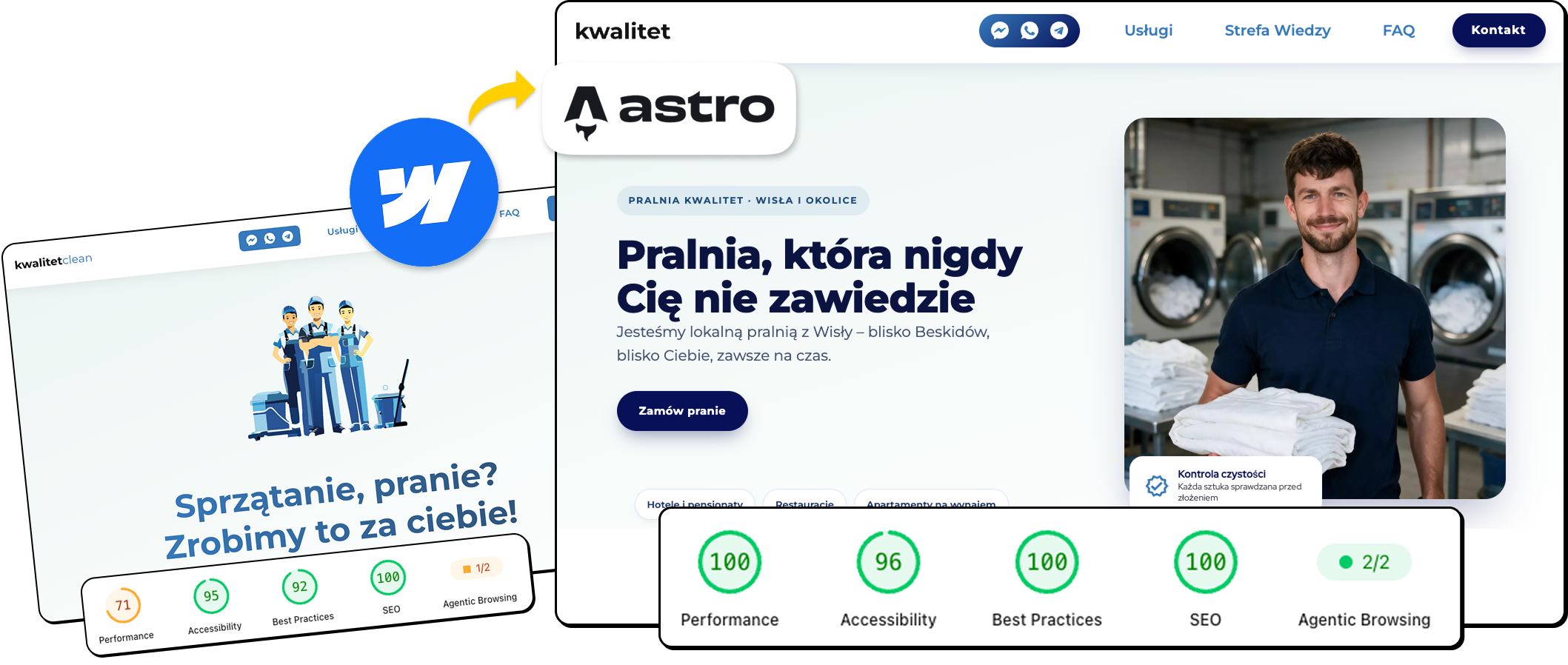
Kwalitet's laundry and cleaning site moved from Webflow to Astro + CMS on our Collections tier. Mobile PageSpeed Performance went from 24 to 89, desktop from 71 to 100 — see the full before/after, screenshots included.

Read the case study
Side-by-side comparison of Kwalitet's homepage before (Webflow) and after (Astro + CMS), with PageSpeed scores improving from 71 to 100 on desktop and 24 to 89 on mobile

Why now

Webflow just changed the deal

In May 2026, Webflow folded its CMS and Business site plans into a single Premium plan and reworked its pricing across the board. If your site was on the old CMS plan, your bill moves from about $23/month to $25/month at renewal – a small bump on its own, but it comes with a bigger one attached: every CMS or Business site is auto-migrated to Premium at its next renewal, or the moment you make a billable change after June 29, 2026, whether you asked for it or not.

That is on top of the reasons people were already looking at the exit:

  • CMS access is now an all-or-nothing decision

    Webflow's Basic plan still does not include the CMS at all – no Collections, no dynamic content, at any price.

  • The item ceiling still exists, it just moved

    Premium raises the shared CMS item limit to 20,000 items across up to 40 Collections, up from 10,000 – more room, but still a hard wall for a site that has been publishing for years.

  • Every editor is a paid seat

    Workspace seats are billed per person, so growing your content team also grows your Webflow invoice.

  • Exporting only gets you the shell

    Webflow's own export gives you HTML, CSS and JS – not your CMS data, not your forms, not your redirects.

None of this makes Webflow a bad tool – it is still what we reach for on some of our own client builds. It means the businesses that outgrew what it was built for now have a plan-change deadline attached to that decision. Here are four ways to act on it.


Questions

Before you decide

Ready when you are

Tell us about your Webflow site

Fifteen minutes and a link to your site is enough for us to tell you which package fits and what it will cost.